Home Page Layout
The LMS home page layout is comprised of sections such as:
Search for Learning- Enter keywords to find available courses.
Required Learning- This section shows assigned required training (assigned by others) prioritized by due date.
Important Learning- This section shows learning assignments assigned as non-required items by managers and the learning team. They are prioritized based on their due dates.
Requests for Me- This section shows any pending requests that you need to address, including observation requests.
Invest in Myself- This section shows any learning that you’ve selected for yourself.
Latest Bookmarks- This section displays saved courses and other learning content flagged using the bookmark feature. It provides an easy way to manage your learning interests in a single page, separated from courses you are already engaged in or have been assigned.
Other Sections- Peer and learning team suggestions appear at the bottom of the page.
Note: Except for Required Learning, Invest in Myself, and Latest Bookmarks, sections will not appear if there is no content.
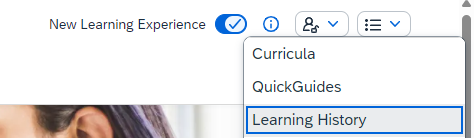
Learning History- Click on the list icon and select 'Learning History' to search, review completed training and print certificate of completion.